Fair warning that applies to this whole blog: I use AI heavily, including for drafting these posts from my own notes and terminal history. The setup described here is what I actually run, and I’ve verified every command before publishing.
A year ago “using AI for code” meant a chat window and a lot of copy-pasting. My current setup looks nothing like that. The AI lives in my terminal, has direct access to my Home Assistant, my n8n instance and my Proxmox host, and I can check on running agent sessions from my phone while walking the dog. This post is the tour.
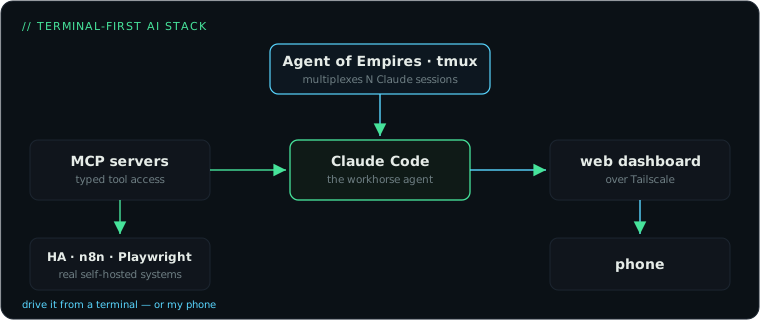
The core: Claude Code
Claude Code is Anthropic’s terminal agent. You type what you want, it reads files, runs commands, edits code, and shows you diffs. The real shift is that it operates on your actual system: it can SSH into my Proxmox host, inspect a failing container, and fix the config, all in one conversation.
My working rules:
- Plan first, then execute. For anything non-trivial I make it lay out a plan before touching anything. Reviewing a plan takes a minute. Reviewing a surprise 40-file change takes an hour.
- Everything in git. Not just code: my Home Assistant configs, my infrastructure notes, this website. If the agent can commit it, the agent can also revert it.
- Small sessions, clear goals. “Fix the backup timer on the Proxmox host” beats “improve my infrastructure”. Agents are like contractors: vague briefs produce confident nonsense.
- Read the diff. Always.
Giving the agent hands: MCP servers
Out of the box an agent can run shell commands. The Model Context Protocol (MCP) is how you give it proper tools for specific systems. Each MCP server exposes typed operations the agent can call, which beats having it curl JSON APIs blind.
What’s wired into my setup:
- Home Assistant MCP: the agent can query entities, inspect automations, check logs. “Why did the hallway light not turn on last night” is now a question I ask in plain text and get a traced answer to.
- n8n MCP: it can search nodes, validate and deploy workflows. More on what we build with that in a future post; it has become the backbone of my home automation.
- Playwright MCP: browser control, mostly for testing web UIs it just built.
Registering one is a single command:
claude mcp add home-assistant -- npx some-ha-mcp-serverIf you self-host anything, this is the unlock. The difference between an agent that can “write YAML that might work” and one that can call your actual API, see the actual error and iterate, is night and day.
The multiplexer: Agent of Empires
Once agents get useful, you stop having one conversation. You have the session refactoring a workflow, the session investigating a Zigbee problem, and the session doing research, all at different stages of needing you. Keeping those in raw terminal tabs falls apart fast.
Agent of Empires (aoe on the command line) is an open source manager for exactly this. It sits on top of tmux and gives you:
- A TUI dashboard listing all your agent sessions and their status, so you can see at a glance which one is waiting for input.
- Multi-agent support: it auto-detects what you have installed. Claude Code and OpenCode, but also Codex CLI, Gemini CLI and a long list of others. Same cockpit regardless of vendor.
- A web dashboard (
aoe serve) with a mobile-friendly view, including rendered plans and diffs.
Install and run:
brew install aoe    # or the curl installer from the repo
aoe                 # TUI
aoe serve           # web dashboard
The web dashboard is the sleeper feature. Mine is served over my Tailscale network with a proper domain, using exactly the reverse proxy setup from my earlier post. Kick off a long-running task at your desk, then approve the plan from your phone in the supermarket queue. Agent work is bursty, you’re needed for thirty seconds every ten minutes, and being able to answer from anywhere means the work doesn’t stall.
Since sessions run inside tmux, nothing dies when I close my laptop; I attach from another machine and everything is still there.
Where to start
If you want to try this shape of working: pick one agent CLI and use it for a week on a low-stakes repo before adding anything else. Then add one MCP server for a system you actually run; that’s the moment it clicks. Only reach for Agent of Empires once you catch yourself juggling multiple sessions, because that’s the problem it solves, and by then you’ll know exactly why you want it.