My entire homelab is one Intel NUC sitting in a closet. No rack, no blinking 2U servers, no 400 watt idle draw. Just a small box running Proxmox VE that hosts everything from Home Assistant to my automation server, and it barely makes a sound.
Here’s how it’s organized, because the layout is the part I’d defend in an argument: almost everything runs as an LXC container, one service per container, and VMs only exist where they genuinely have to.
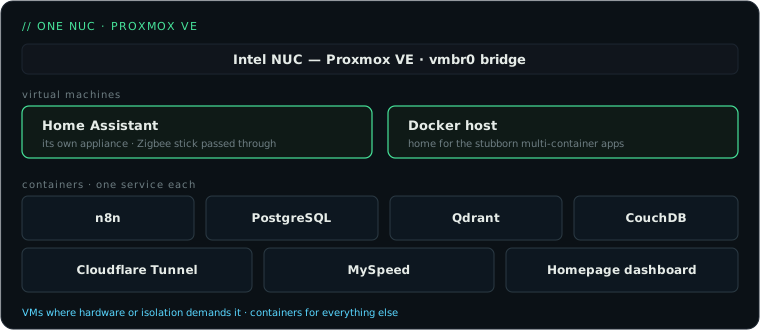
The inventory
This is what pct list and qm list show on my host right now:
| Service | Runs as | What it does |
|---|---|---|
| Home Assistant | VM | the smart-home brain, with the Zigbee stick passed through |
| Docker host | VM | a home for the stubborn multi-container apps |
| n8n | container | workflow automation — the heart of a lot of things |
| PostgreSQL | container | a database for whatever needs one |
| Qdrant | container | vector database for the AI experiments |
| CouchDB | container | syncs my Obsidian vault |
| Cloudflare Tunnel | container | exposes the handful of things that go public |
| MySpeed | container | keeps an eye on my internet speed |
| Homepage | container | one dashboard that links to all of it |
Two VMs, everything else a container. That ratio is deliberate.
Why LXC first, VMs second
The common homelab pattern is one big VM running Docker with twenty containers inside. I went the other way, and it’s the better trade for a single small machine:
LXC containers share the host kernel. No virtualization overhead, no reserved RAM. My PostgreSQL container idles at around 60 MB. A VM doing the same job would have a whole kernel, systemd and a memory balloon to babysit.
One service per container means blast radius control. When I broke the CouchDB container experimenting with replication settings, nothing else noticed. Snapshot, roll back, done. With a shared Docker VM, every experiment happens in the same failure domain.
Proxmox treats containers as first class citizens. Backups, snapshots, firewall rules, resource limits: all per container, all in one UI, all scriptable through pct and the API.
The two exceptions prove the rule:
- Home Assistant OS wants to be an appliance. HAOS manages its own OS, add-ons and updates. Running it as a VM with USB passthrough for the Zigbee stick is the supported, correct choice. Map the stick once with
qm set 100 -usb0 host=...and it survives reboots fine. - Some software really wants Docker. Anything that ships as a five-container compose file goes to the Docker VM. Docker inside LXC is possible (a privileged container with nesting enabled) and I use that trick occasionally, but for a whole compose stack a small VM is less fragile.
Setting this up yourself
The outline is short:
1. Install Proxmox VE. Grab the ISO from proxmox.com, write it to a USB stick, install on any x86 box with 16 GB of RAM or more. A used NUC or a mini PC with an efficient CPU is ideal. Mine draws under 15 watts most of the day.
2. Deal with the subscription nag. Add the no-subscription repository so you get updates without a license:
echo "deb http://download.proxmox.com/debian/pve bookworm pve-no-subscription" \
  > /etc/apt/sources.list.d/pve-no-subscription.list
apt update && apt full-upgrade
3. Download container templates. Proxmox has a built-in template catalog:
pveam update
pveam available | grep -E "debian-12|alpine"
pveam download local debian-12-standard_12.7-1_amd64.tar.zst
I use Debian for most containers and Alpine where I want something really small (the PostgreSQL container is Alpine).
4. Create containers with sane defaults. For a typical service:
pct create 104 local:vztmpl/debian-12-standard_12.7-1_amd64.tar.zst \
  --hostname n8n --memory 1024 --cores 2 \
  --net0 name=eth0,bridge=vmbr0,ip=dhcp \
  --rootfs local-lvm:8 --unprivileged 1
Unprivileged unless a service forces your hand. Give each container a DHCP reservation in your router so the IPs stay predictable; half of self-hosting pain is services losing track of each other.
5. One service per container. Resist the urge to “just also install” something in an existing container. Containers are nearly free. Making them disposable is the whole point.
The dashboard tip
One container runs Homepage, and I’d deploy it as one of the first things. Once you’re past five services you will forget ports and IPs. A single page that lists everything, with health checks, changes how the whole lab feels. It’s also the page I point my girlfriend to when she asks whether “the internet thing” is broken.
If you’re starting from zero: buy a used mini PC, install Proxmox, make your first LXC container. The step from “Raspberry Pi with some Docker containers” to “actual virtualization platform” is much smaller than it looks, and it changes what you’re willing to try.