As usual: built by me over a weekend (with an AI pair programmer doing the SSH legwork), written up with AI help, checked by me.
In my previous post I mentioned being uneasy about n8n hanging off a public Cloudflare Tunnel. My automation server can read my email and talk to my bank exports. It should not have a hostname that anyone on the internet can poke at, WAF or not.
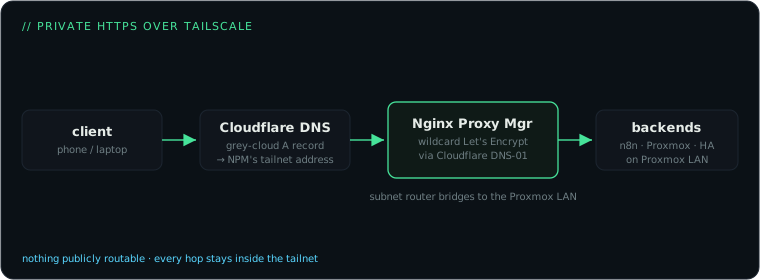
So this weekend I rebuilt remote access around a different idea: nothing is public, everything is on a private mesh network, but everything still gets a real domain name and a valid HTTPS certificate. The result is that n8n.ts.larsjelle.nl works from my phone on the train exactly like it works from my desk, and from anyone else’s device it resolves to an address that goes nowhere.
Three pieces make that work.
Piece 1: Tailscale as the network
Tailscale is WireGuard with the annoying parts automated. Install it, log in, and every device gets a stable private address on the tailnet and can reach every other device regardless of what network it’s physically on. The free tier covers a personal setup comfortably; my tailnet is currently 7 nodes (the Proxmox side, my laptop, a Mac mini, Home Assistant, two phones and a Windows machine).
The trick that saves you from installing Tailscale in every container is a subnet router. I made a small dedicated LXC container on Proxmox that joins the tailnet and advertises my whole LAN:
tailscale up --advertise-routes=<your-lan-subnet> --advertise-exit-nodeApprove the route in the Tailscale admin console and every device on the tailnet can reach the whole LAN. One gotcha: traffic arriving from the tailnet shows up with a tailnet source address your LAN devices don’t know how to answer, so add a masquerade rule on the subnet router (made persistent across reboots) that makes it look like local traffic.
Piece 2: Nginx Proxy Manager for names and certificates
Raw addresses and ports work, but handing the household an unmemorable link with a certificate warning is not a setup anyone will adopt. I run Nginx Proxy Manager (NPM) in its own container on Proxmox. It does two jobs:
- Reverse proxy:
n8n.ts.larsjelle.nlforwards to the n8n container,proxmox.ts.larsjelle.nlto the Proxmox UI on port 8006, and so on. Nine services so far, all defined in a friendly UI. - One wildcard certificate: a single Let’s Encrypt cert for
*.ts.larsjelle.nl.
The certificate part is where most private-network guides fall apart, because Let’s Encrypt normally needs to reach your server over the internet to validate. The way around that is the DNS-01 challenge: instead of connecting to you, Let’s Encrypt asks you to prove domain control by creating a DNS record. NPM automates this. Create a Cloudflare API token with Zone.DNS edit rights, paste it into NPM’s SSL settings, request *.ts.larsjelle.nl, and renewal happens on its own from then on. Your services never need to be reachable from the internet.
Practical NPM-on-Proxmox note: NPM ships as a Docker image, so its LXC container needs Docker inside, which means a privileged container with the nesting feature enabled. It’s a proxy, the thing that’s supposed to be in front, so I’m comfortable with the exception.
Piece 3: Cloudflare DNS pointing into the tailnet
Here’s the part that feels wrong the first time: the DNS records for *.ts.larsjelle.nl live in normal public Cloudflare DNS, but they point at the NPM container’s private tailnet address — plain A records, set to DNS-only.
Anyone in the world can look up those records, and it does them no good: a tailnet address is only routable if you’re a logged-in member of my tailnet. Public names, private destinations: real DNS, real certs, zero exposure.
The setting that cost me an evening: the orange cloud. Cloudflare proxies new DNS records by default (“Proxied”, the orange cloud icon). For these records that’s fatal, because Cloudflare’s edge tries to connect to that private address itself, can’t reach your private network, and serves a 5xx error page. Every record pointing at a tailnet address must be set to DNS only (grey cloud). If you switch one to grey and it still fails, wait out the DNS cache or flush it; the old edge IP lingers.
Why not just use Tailscale’s built-in MagicDNS names? You can. I wanted names under my own domain, one wildcard cert instead of per-node certs, and names that don’t change if I restructure the tailnet. If you don’t care about that, tailscale serve gets you HTTPS on a .ts.net name with none of the above.
The migration itself
With this in place I moved n8n off the public tunnel. The change was anticlimactic: point the DNS record at the tailnet, delete the tunnel route, update the webhook URL in n8n’s config. The cloudflared container still exists but no longer fronts anything sensitive; a locked-down tunnel is still the right answer for the rare thing that genuinely must accept traffic from outside (a webhook from a third-party service, for example).
Setup checklist
If you want to build the same thing:
- Tailscale on your devices, plus one small Linux box/container as subnet router (
--advertise-routes, approve in admin console, add the masquerade rule). - Nginx Proxy Manager somewhere on that LAN.
- A domain on Cloudflare (or any DNS provider with API support that Let’s Encrypt DNS-01 plugins understand). Dedicate a subdomain like
ts.yourdomain.comto the private stuff. - Cloudflare API token, wildcard cert in NPM via DNS-01.
- A records for each service, pointing at NPM’s tailnet address, grey cloud.
- Add proxy hosts in NPM, enable WebSocket support for anything interactive (n8n and Home Assistant both need it).
Total cost: zero. Tailscale free tier, Let’s Encrypt free, Cloudflare free plan. The only thing you pay for is the domain you probably already own.